
For thousands of serving and retired personnel from the Central Armed Police Forces and police organizations, Kendriya Police Kalyan Bhandar (KPKB) has long been the go-to source for subsidized daily essentials and consumer goods. The Ministry of Home Affairs has been steadily modernizing the system, and the old paper-based Prahari Canteen process has now largely given way to a digital platform.
Eligible beneficiaries can complete consumer registration online, download a Digital Canteen Card, check registration status, and access welfare services directly through the official KPKB portal — no need to visit multiple offices for what used to be a fairly manual process.
What Is KPKB (Kendriya Police Kalyan Bhandar)
Kendriya Police Kalyan Bhandar is a welfare organization under the Ministry of Home Affairs, established on 18 September 2006 to provide subsidized consumer products and welfare benefits to eligible police and paramilitary personnel. It has grown into one of India’s largest welfare distribution networks — over 35 lakh beneficiaries across the country, served through roughly 119 Master Bhandars functioning as warehouses and more than 1,800 Subsidiary Bhandars as retail outlets nationwide.
The organization covers subsidized grocery items, household products, electronics, and selected vehicle purchases through this network.
From Prahari Canteen to a Digital Platform
The older Prahari Canteen system leaned heavily on physical cards and manual records for both purchases and identity verification. The digital platform changes that — beneficiaries can register online without the old paperwork, download a Digital Canteen Card with a QR code, track registration status, authorize family members, and apply for vehicle allotment, all through the Consumer Portal.
The QR-based card in particular has cut down verification time at outlets considerably and removed a lot of the manual steps that used to slow things down.
KPKB Official Portal — kpkb.mha.gov.in and kpkbmha.in
Several unofficial websites show up in Google search results for KPKB-related queries, so it’s worth sticking to the two genuine portals. The main portal, kpkb.mha.gov.in, handles consumer registration, registration status, notifications, downloads, and official announcements. The Consumer Portal, kpkbmha.in, is where login, Digital Canteen Card download, profile management, family authorization, and vehicle booking (where available) actually happen. Personal or service details should never go on anything outside these two.
| Service | Details |
|---|---|
| Consumer Registration | Register through the official KPKB portal |
| Login | Access account using User ID and Password |
| Digital Card | Download QR Code-based Digital Canteen Card |
| Registration Status | Check online using Application ID or Service Number |
| Vehicle Booking | Available through the Consumer Portal for eligible users |
| Family Authorization | Add eligible dependent family members |
| Helpline | 011-24367777 |
| Email ID | [email protected] |
KPKB Eligibility — Who Can Register
If you’ve served or are currently serving with CRPF, BSF, CISF, ITBP, SSB, NSG, NIA, Intelligence Bureau, SPG, NDRF, CBI, or a State Police Force, you’re likely covered. Railway Protection Force personnel qualify too, where the scheme extends to them. Widows of eligible personnel, along with spouses and dependent children, are generally included as well.
That’s a lot of organizations, and the fine print changes from time to time — so rather than going purely off a list like this, it’s worth pulling up the current eligibility guidelines on the official portal before assuming either way.
KPKB Benefits — What You Actually Get
Beyond the basics — subsidized groceries and household essentials, consumer electronics at concessional prices — registered consumers also get access to selected vehicle purchase schemes, the QR-based Digital Canteen Card, online account management, and the ability to authorize family members for canteen access. Depending on availability and current rules, eligible beneficiaries may also get concessional pricing on selected Maruti Suzuki vehicles through the KPKB vehicle booking system.
Documents Required Before Starting Registration
Having these ready in advance makes the process smoother:
- Service Identity Card or Retirement Certificate,
- Aadhaar Card,
- a passport-size photograph,
- Service Number or PPO Number (for retired personnel),
- an active mobile number,
- a valid email address.
- After submission, the concerned authority verifies the application before login credentials get issued.
KPKB Consumer Registration Online — Step by Step
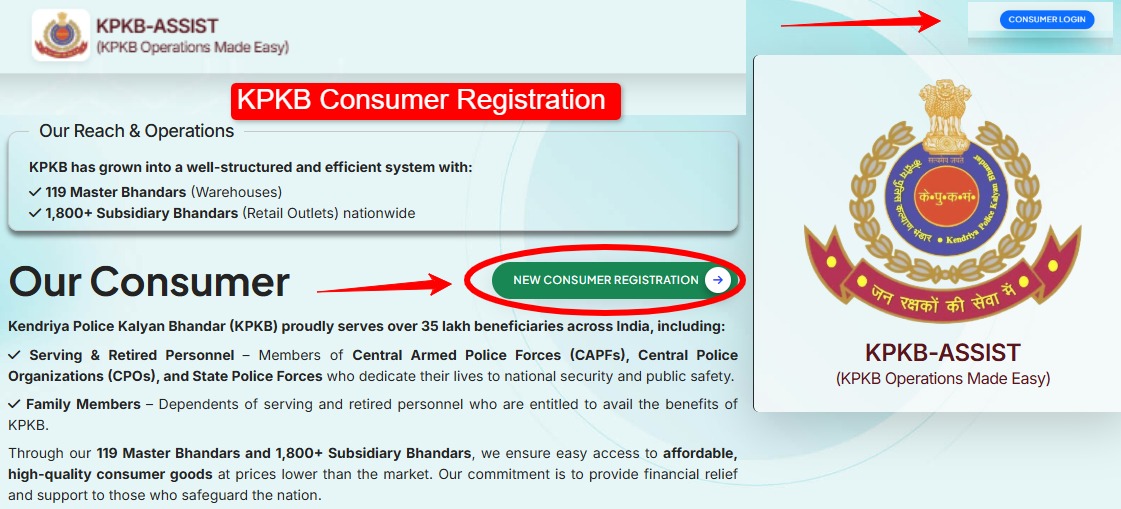
Start at the official KPKB Consumer Portal and click “New Consumer Registration” on the homepage — this is for anyone creating an account for the first time. Double-check you’re on the official site before entering anything personal.
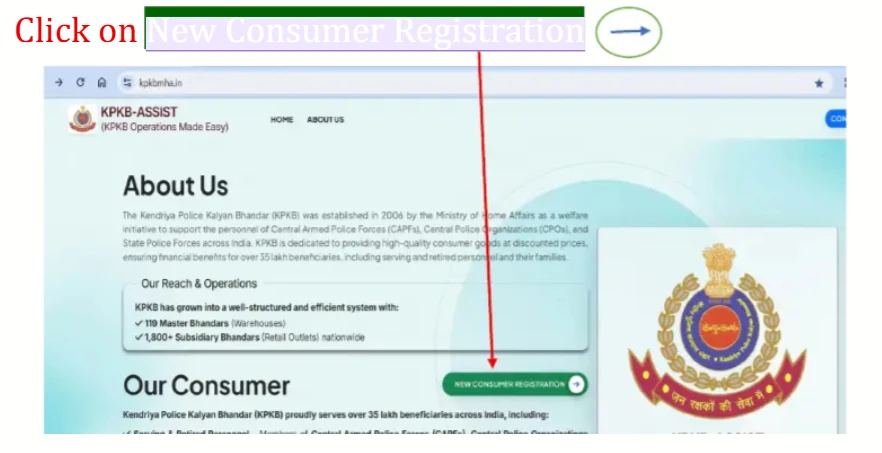
The registration form asks for Full Name, Father’s Name, Mobile Number, Email ID, Date of Birth, PAN Number, Service Status, and Service/Regimental Number — enter these exactly as they appear in official records or on the PAN Card, since any mismatch with service records can delay verification. Click Next once everything’s filled in.
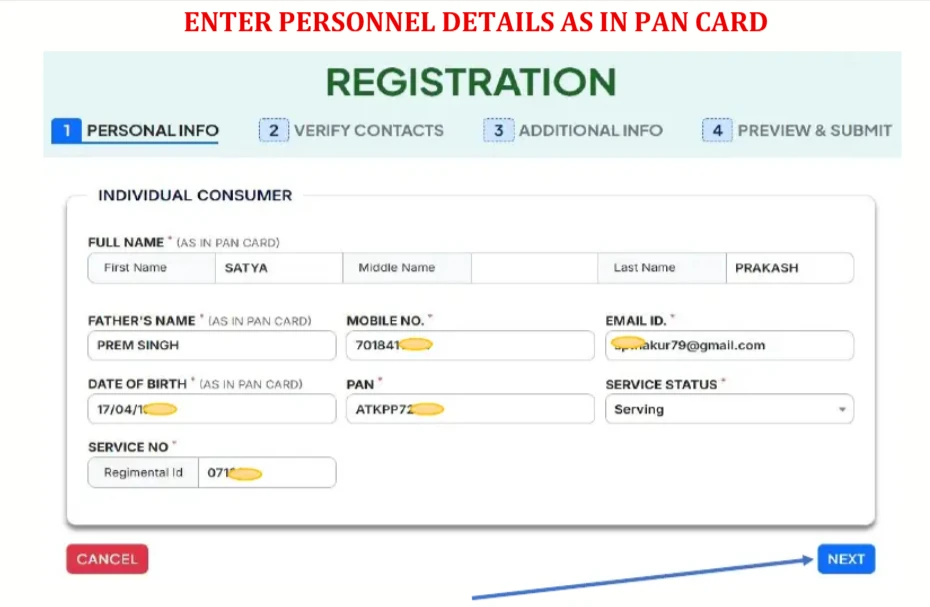
The portal then sends separate OTPs to the registered mobile number and email — verify both, then set a password (mix of uppercase, lowercase, numbers, and special characters works best) and click Next. Worth saving that password somewhere safe, since it’s needed for every future login.
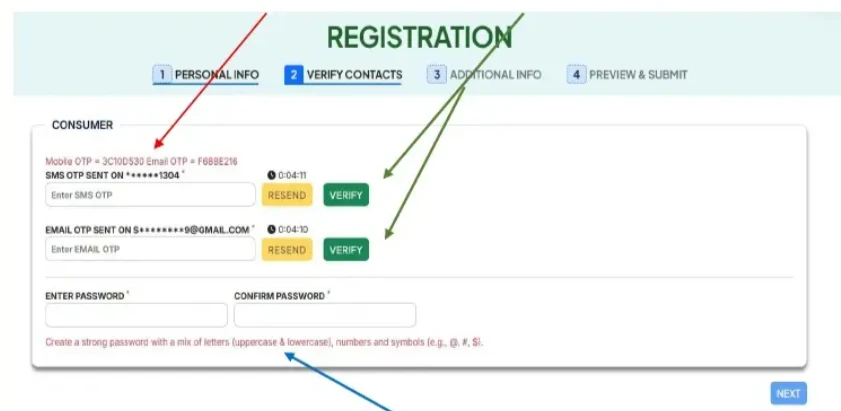
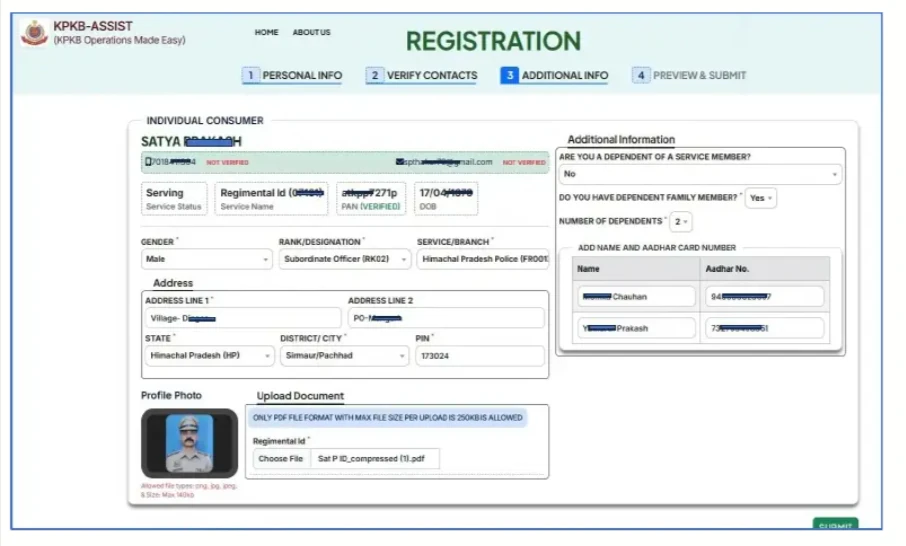
The next section covers Gender, Rank/Designation, Service Branch, Residential Address, State, District, and PIN Code, plus questions about whether you’re a dependent of a service member and whether you have dependent family members — if so, their names and Aadhaar numbers go in here too.
Last step is uploading documents — Service Identity Card or Retirement Certificate, passport-size photograph, and anything else requested. Clear photos, correct file format, and staying within the size limit all matter here. Once everything’s in, click Submit.
What Happens After Submission
A Registration or Application ID gets generated right away, and the application moves forward for verification — the concerned authority checks service details and documents, and once approved, login credentials go out to the registered mobile number or email. This usually takes several working days, depending on how quickly departmental approval moves.
Once approved, logging in, downloading the Digital Canteen Card, checking status, authorizing family members, and accessing welfare services all become available.
KPKB Consumer Login and Forgot Password
Open the Consumer Portal, click “Consumer Login,” enter the User ID and Password, complete any required verification, and click Login — that lands on the consumer dashboard where the various services live.
- Forgotten password?
- Click “Forgot Password” on the login page,
- enter the registered mobile number or User ID,
- verify via OTP,
- set a new password.
- If that process doesn’t work for some reason, the official KPKB helpline can help sort it out.
KPKB Digital Canteen Card Download
Once registration’s approved, log in, open the dashboard, select “Download Canteen Card,” and save the PDF — printable if a physical copy is needed. The card carries a unique QR code that gets scanned at outlets for faster identity verification, and it’s gradually replacing the older physical canteen cards in many locations as the system modernizes further.
KPKB Registration Status Check
The Registration Status section on the official portal takes either an Application ID or Service Number and shows the latest status.
| Status | Meaning |
|---|---|
| Submitted | Application has been received successfully |
| Under Verification | Service records are currently being verified |
| Approved | Registration approved, login credentials issued |
| Rejected | Application not approved — review the reason, correct the issue, and reapply if permitted |
If something sits Under Verification for an unusually long stretch, the KPKB helpdesk is worth contacting directly rather than waiting indefinitely.
Vehicle Booking Through KPKB
Beyond groceries and electronics, KPKB periodically makes vehicles — Maruti Suzuki models, among others — available at concessional prices through the network, subject to availability and the applicable scheme. Rather than going through a dealership, eligible consumers submit their request through the portal, and depending on demand, allocation happens via waiting list or allotment process.
If vehicle booking shows up on your account: log in, open the Vehicle Booking section, browse available models, select one, submit the request, and wait for confirmation. Waiting periods vary quite a bit with stock and demand — several months isn’t unusual.
KPKB Family Member Authorization
Log in to the Consumer Portal, open Card Management, select Authorize Family Member, enter the required details, upload a recent photograph and supporting documents if asked, and submit for approval. Once approved, that family member can use the Digital Canteen Card per KPKB rules.
Common KPKB Registration Issues and Solutions
Service Number not recognized — first confirm it’s entered exactly as it appears in official service documents. Still stuck? The department or nearest KPKB Master Canteen can help with manual verification.
Registration rejected — usually incomplete information, incorrect service details, or a document mismatch. Check the stated rejection reason on the portal and make sure supporting documents match official records before reapplying.
Approved but can’t log in — check the SMS inbox and registered email account first, then try Forgot Password if needed. Still nothing after approval? Contact the KPKB helpdesk directly.
Digital Canteen Card not showing up — sometimes it takes a few days to generate after approval. Wait, log in again and check the dashboard, and contact support if it’s still missing after that.
FAQ
How do I register for KPKB Consumer Registration? Through the official KPKB portal’s Consumer Registration section — fill in service and personal details, upload the required documents, and submit. Login credentials go out to eligible applicants after verification.
Who can apply? Serving and retired personnel from eligible Central Armed Police Forces, police organizations, and other notified agencies, along with eligible family members and widows under applicable rules.
How do I download my Digital Canteen Card? Once approved, log in to the Consumer Portal and select Download Canteen Card from the dashboard — save it digitally or print it.
How do I check my registration status? The Registration Status page on the official KPKB website takes an Application ID or Service Number and shows the current status.
Can family members use KPKB facilities? Yes, eligible family members can be authorized through the Consumer Portal subject to KPKB guidelines and verification.
Does KPKB offer vehicle purchase benefits? Eligible consumers may apply for selected vehicle purchase schemes whenever they’re available — availability, pricing, and eligibility all depend on current KPKB policies.
For related welfare portal guides, the KPKB Canteen Card Download guide covers the download process in more detail, the KPKB Consumer Login guide walks through login troubleshooting specifically, and the KPKB Vehicle Booking guide goes deeper into the booking process. For personnel from other forces, the Himveer Connect ITBP Login guide and HAMRAAZ Login guide cover related service portals.
| Purpose | Contact |
|---|---|
| Official Website | kpkb.mha.gov.in |
| Consumer Portal | kpkbmha.in |
| [email protected] | |
| Helpline | 011-24367777 |