
BSF jawan Vikram from Patna battalion couldn’t use his old KPKB canteen card in August 2025. The canteen operator said: “Purana card band ho gaya — 16 July 2025 ke baad naya digital card chahiye.”
He went to home.kpkbmha.in. Logged in. Dashboard showed “Download ID Card.” Downloaded PDF. Laminated it. Back to canteen next day.
KPKB Canteen Card 2026 is fully digital. Old physical booklet cards were invalidated from 16 July 2025. New system = Computer-generated ID card downloadable from home.kpkbmha.in + QR-based Digital Canteen Card on phone. All CRPF, BSF, CISF, ITBP, SSB, State Police serving and retired personnel must register and download the new card.
Consumer Portal: home.kpkbmha.in Registration/Info: kpkb.mha.gov.in Helpline: 011-24367777
Quick Answer: Login: home.kpkbmha.in → Consumer Login → Email ID + Password + OTP Download Card: Login → Dashboard → “Download ID Card” → PDF → Print + Laminate Old card invalid? Register at home.kpkbmha.in → New Consumer Registration → Wait for approval Helpline: 011-24367777
⚠️ Two Portals — Critical Difference
Most common confusion — fix this first:
| Portal | What it does |
|---|---|
| kpkb.mha.gov.in | Information only — rules, OM, price list, news |
| home.kpkbmha.in | Consumer portal — LOGIN, card download, registration status |
Card download = only at home.kpkbmha.in kpkb.mha.gov.in = no login, no card download
⚠️ Old Cards Invalid from 16 July 2025
Most important update — many personnel don’t know:
Physical booklet canteen cards = invalidated from 16 July 2025. All canteens = only accepting new digital cards. Not registered yet? Register at home.kpkbmha.in immediately. Already registered but not downloaded new card? Login → Download ID Card.
Canteen Card Download — Step by Step
If already registered and approved:
Step 1: Go to home.kpkbmha.in
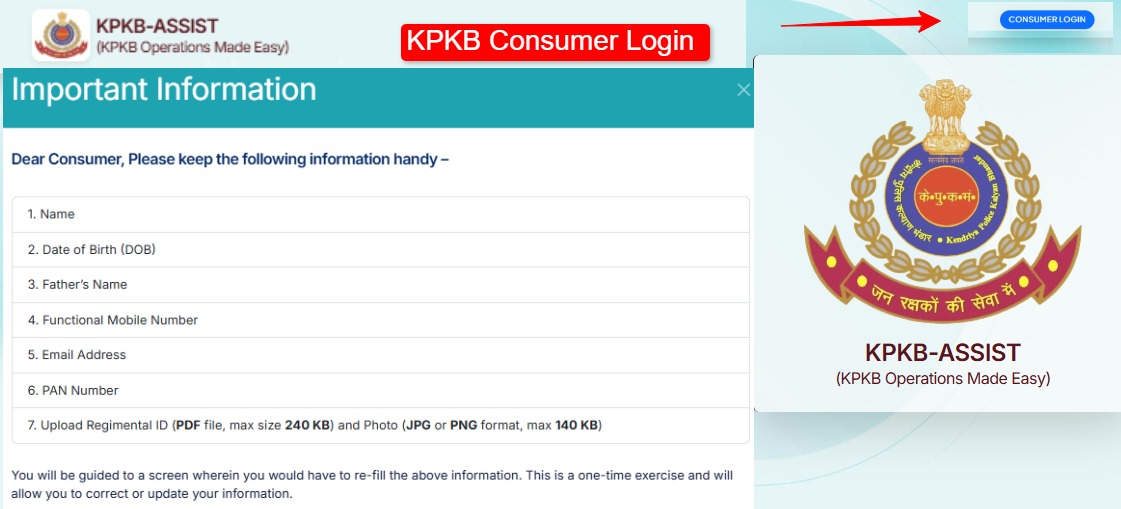
Step 2: Click “Consumer Login”
Step 3: Enter:
- Username = Email ID (registered at time of application)
- Password
- Captcha code
- Click “Login”
Step 4: Mobile OTP → verify
Step 5: Dashboard → “Download ID Card” button
Step 6: PDF downloads → Print + Laminate
This is a computer-generated card — legally valid at all KPKB outlets. Laminate for durability — it is a physical card you carry.
Digital Canteen Card — QR Code Version
2026 update — phone-based:
QR-based Digital Canteen Card = on your smartphone. Dashboard → “Digital Card” section → QR code displayed. Show QR at canteen counter → scanner verifies in 30 seconds. No physical card needed.
New Registration — If Not Registered Yet
Step 1: home.kpkbmha.in → “New Consumer Registration”
Step 2: Fill details:
- Full name (as per PAN card)
- Email ID
- Mobile number
- Date of birth
- PAN number
- Service status: Serving / Retired
- Force/Organization
Step 3: Upload documents:
- Service ID / Retirement certificate
- Aadhaar card
- Passport photo
Step 4: Submit → Application goes to unit → SB (Subsidiary Bhandar) → HQ KPKB verification
Step 5: Approval → Login credentials via email/SMS → Download card
Approval time: 7-30 working days depending on unit verification speed.
Check Application Status
Without login: kpkb.mha.gov.in → “Application Status” → Service Number / Application ID → Submit
With login: home.kpkbmha.in → Dashboard → Application status visible
| Status | Meaning |
|---|---|
| Submitted | Received — unit pending |
| Unit Verified | Unit approved → SB/HQ pending |
| Approved ✅ | Card ready → Download |
| Rejected | Reason visible → Correct → Reapply |
Family Member Authorization
Login → “Card Management” → “Authorize Family Member” → Upload photo → Submit
Authorized family member = can use canteen on your behalf. Within your monthly purchase limit.
⚠️ Fake Website Warning
Multiple fake KPKB websites exist — identical design. Only official: home.kpkbmha.in kpkb.mha.gov.in Never enter credentials on: kpkb.org / kpkb.co.in / kpkbmha.gov.in (fake) KPKB never asks for OTP or password on phone call.
Common Problems + Fix
“Download ID Card button not visible”: Application not yet approved. Check status. Or unit has not verified yet — contact your Unit Clerk.
“Invalid username or password”: Username = Email ID you registered with. Password case-sensitive. Forgot password → Login page → “Forgot Password” → Mobile OTP.
“OTP not received”: Mobile number correct in profile? DND off? Wait 2 minutes. Retry.
“Card shows blank / incorrect details”: Service record mismatch. Visit nearest Master Canteen in person with service ID for correction.
“Canteen not accepting my card”: Check card expiry date. Digital card = show QR. Old booklet = no longer valid from July 2025.
FAQ
KPKB canteen card kaise download karein? home.kpkbmha.in → Consumer Login → Email ID + Password + OTP → Dashboard → Download ID Card → PDF → Print.
Purana card kab se invalid hua? 16 July 2025 se purane physical booklet cards band. New digital card mandatory.
kpkb.mha.gov.in aur home.kpkbmha.in mein kya fark hai? kpkb.mha.gov.in = information portal. home.kpkbmha.in = consumer login + card download.
Helpline: 011-24367777 | home.kpkbmha.in
Official Links
| Purpose | Link |
|---|---|
| Consumer Login + Card Download | home.kpkbmha.in |
| Registration / Info | kpkb.mha.gov.in |
| Helpline | 011-24367777 |
Vikram downloaded his new card in 5 minutes. Back at the canteen next day. No issues.
CRPF, BSF, CISF, ITBP, SSB, State Police — if you have not downloaded your new digital KPKB card yet, go to home.kpkbmha.in now. Old cards invalid since July 2025.
Related Articles:
good
Good morning mammip
IQ